
I work from home. Have for over a decade. Small office, worn keyboard, golden retriever puppy who has decided my chair is her chair.
The morning nx-console hit, I was on a break between tasks reading TLDR Dev. May 18. A compromised release of a VS Code extension, live on the marketplace for eleven minutes before takedown. In that window, the payload swept credentials from a list of paths that read like a tour of every credential surface on a developer's machine: GitHub PATs, npm tokens, AWS keys, HashiCorp Vault tokens, Kubernetes service account tokens, 1Password vaults. The part that caught me wasn't the credential sweep. The part that caught me was that the list explicitly named .claude/ config files as a target.
Closed the email. Opened a terminal.
Work machine first. The compromised release of nx-console had never been on it. None of the other packages named in that wave were on it either. No surprise entries in any config. No plaintext credentials anywhere. Clean.
Then my personal machine.
cat ~/.claude/settings.jsonOne SessionStart hook. A bash script. Runs where-did-i-leave-off.sh from my home directory. I wrote it last year. It prints a "where did I leave off" digest when Claude Code starts a session. Useful. Mine.
The credentials side came up empty too. No plaintext API keys in any MCP config. No surprise entries. Relief on both fronts. Took the puppy out, came back to the desk.
Then I looked at CommonCents. A personal project I keep around. Old .claude config from early days, before I started looking at what I was installing. claude-flow from 2024, never cleaned out. Four hook events firing on every session of a tool I no longer use. PreToolUse, PostToolUse, PreCompact, Stop. Hooks I didn't remember adding, on a project I wasn't planning to open that day, running scripts I'd have to go read line by line to know what they did. The audit didn't surface a threat. The audit surfaced me. What I'd installed and forgotten. What I'd left running. The findings were boring. The exercise wasn't.
Three weeks later, the worm in this article landed. The one I'm writing about now drops the exact shape of file I already had in my own settings, a SessionStart hook with a bash script that runs on startup, into other people's machines. My hook was mine. Tomorrow's might not be.
Morphisec published a deep dive on June 8. OX Security's tracker is still open. Some people are calling this one Shai-Hulud Wave 3. Others call it Miasma binding.gyp. At least 57 packages, at least 286 malicious versions, including @vapi-ai/server-sdk (over four hundred thousand downloads a month on npm) and ai-sdk-ollama (over a hundred and twenty thousand a month). The named target list reads like a tour of what most developers had on their machine in 2026: .claude/settings.json. .cursor/rules/setup.mdc. .gemini/settings.json. .vscode/tasks.json with a folderOpen trigger.
Here's how it does it. A poisoned npm package drops a 157 byte `binding.gyp` file at install time. The package.json has no preinstall and no postinstall. The post install scanner everyone deployed after last month's worm has nothing to flag. But node-gyp runs anyway when a native addon shows up, the way it always does. The malicious binding.gyp tells it to rebuild. The build writes a SessionStart hook into .claude/settings.json. The hook survives npm uninstall. Every time Claude Code starts on that machine, the hook fires. The script the hook runs is theirs now, not yours.
I'll show you exactly what to check on yours. First, why this class of target is different.
Three notable supply chain attacks landed in eight days that May.
On May 11, the TanStack attack shipped eighty four malicious package versions across forty two @tanstack/* packages. The mechanism made the headlines: a pull_request_target workflow gave fork code elevated permissions, the attacker poisoned the pnpm GitHub Actions cache, a legitimate maintainer's workflow restored the poisoned cache, the malicious code pulled the ambient OIDC token straight out of the runner process's memory, the attacker published through the legitimate pipeline identity.
Here's the part that should sit with you. Those packages carried valid SLSA Build Level 2 attestations, which is what npm's --provenance flag produces. Every provenance check passed. Read that sentence again. The cryptographic proof of where and how those packages were built was correct. The packages were malware. Both of those are true at the same time and there is no version of your CI that catches it.
A build system that actually met SLSA Build Level 3 isolation (caches that can't be poisoned by build code, secrets that can't be read by build code) would have blocked the attack vector. None of that mattered for the attestations themselves. The attestations were cryptographically valid.
Three days later, on May 14, the node-ipc package shipped a malicious update that targeted ~/.claude.json, ~/.claude/mcp.json, and .kiro/settings/mcp.json specifically. A hundred and thirteen credential paths on Linux. A hundred and twenty seven on macOS. There was no Windows list. For one brief moment in computing history, Windows was the safe platform. Datadog's Security Labs and SafeDep independently traced its exfiltration: DNS tunneling through public resolvers, 1.1.1.1 and 8.8.8.8, chunking the credentials into DNS labels sent to sh.azurestaticprovider[.]net. That channel doesn't touch most egress firewalls. Most teams aren't inspecting DNS at the query level. It's a place data leaves and nobody watches.
Four days after that, on May 18, nx-console hit the VS Code Marketplace. Version 18.95.0. The one from the top of this article. Different distribution channel from node-ipc, same target list. StepSecurity called it possibly one of the first supply chain payloads built to harvest AI coding assistant credentials and configs. Eleven minutes live before takedown. Eleven minutes is the time it takes me to step away from the desk and decide what I'm actually going to do this morning.
The pattern across all of these is the same. AI tool configs are now a named target category. Not a side effect, not collateral. The target. And if your tool of choice isn't on these lists yet, that isn't safety. The lists track adoption. Attackers go where the installs are.
The reason this is worse than .env is the part most developers haven't sat with yet. .env files hold credentials. Stolen credentials are bad. But a stolen key is loot. The attacker has to carry it off and use it somewhere else, and the moment you rotate it, it dies in their hands. An AI tool config is different. It doesn't just hold credentials. It holds executable surface. SessionStart hooks. PreToolUse hooks. Tasks that fire on folder open. Rules files that fire on every prompt. When something rewrites that config, it isn't just stealing a key. It's installing itself inside the agent that has access to your codebase and your terminal.
When the AI agent itself becomes the persistence layer, the threat model isn't "they got your secrets." It's "they got your agent."

The defaults are bad. Not in the abstract. In numbers.
Astrix Security ran a study of 5,205 open source MCP server repositories last year. Eighty eight percent of the repos need credentials to run. Of the servers that need credentials, fifty three percent rely on long lived static ones. Of the servers using API keys, seventy nine percent pull them from plain environment variables.
Picture any nine MCP servers. Eight of them want a key. About half of those keys never expire. Three out of four of the API keys sit in plaintext on somebody's disk right now. My machine isn't outside that distribution. Probably yours isn't either.
Cursor stores global MCP configuration at ~/.cursor/mcp.json in plaintext. Claude Code stores its OAuth credentials in the macOS Keychain on Mac, in ~/.claude/.credentials.json with mode 0600 on Linux. That part is fine. The part that isn't fine is where the actual MCP server configurations live: ~/.claude.json for user scope, .mcp.json at the project root for project scope. Plain JSON on disk, holding whatever tokens the setup tutorial told you to paste in. And settings.json sits right next to them holding the hooks.
Every MCP setup guide I have ever read shows the same shape. Open the config. Paste your API key here. Save. Restart the tool. Done.
That instruction came from official docs. From vendor blogs. From the "Get Started with X MCP Server" tutorial every developer who ever tried to wire one of these up has copied a snippet out of. The plaintext default isn't a developer mistake. It's an industry default with a long paper trail.
There are better patterns. They exist. None of them are the path of least resistance. The path of least resistance is paste and save. Multiply that by the population of developers who have ever set up an MCP server in their life, and you have eighty eight percent of MCP servers configured to require credentials, fifty three percent storing them long lived and static, seventy nine percent in plain env vars.
Then a worm shows up and discovers that this entire surface has been sitting unattended.
There are three layers worth working on. Each one shrinks the surface. None of them make you safe. We'll come back to that part.
One prerequisite before this layer. If you haven't blocked AI agents from reading your .env files yet, that's still its own problem. The previous article in this series walks through what the current flagship coding agents do with an unprotected .env and ships with a prompt you can paste into your own agent to set up the defenses. Do that first. This layer is the next floor up.
The pattern Travis McPeak (Cursor's head of security) has been telling people to use is the 1Password CLI. The shape:
op run --env-file=.env -- mcp-server startYour .env doesn't contain values. It contains references:
ANTHROPIC_API_KEY=op://AI/Anthropic API/credential
GITHUB_TOKEN=op://AI/GitHub PAT/token
ELEVENLABS_API_KEY=op://AI/ElevenLabs API/credential
The CLI decrypts in memory, injects as environment variables for the process lifetime, and removes them on exit. Nothing on disk. Nothing in plaintext. Nothing in a config file the next worm can grep for.
This is what's on my personal machine for the MCP servers I actually use. Took an afternoon to convert. Worth the afternoon.
VS Code supports a related pattern in its MCP config: an input variable with "type": "promptString" and "password": true. VS Code stores the value securely instead of writing it into the JSON file:
{
  "inputs": [
    {
      "type": "promptString",
      "id": "anthropic-api-key",
      "description": "Anthropic API Key",
      "password": true
    }
  ],
  "mcpServers": {
    "anthropic": {
      "command": "node",
      "args": ["server.js"],
      "env": {
        "ANTHROPIC_API_KEY": "${input:anthropic-api-key}"
      }
    }
  }
}
Cursor doesn't have an equivalent. It interpolates ${env:NAME} from your shell environment, and secure input is an open feature request on their forum. Claude Desktop does not appear to support the pattern either. Claude Code expands ${ENV_VAR} references in .mcp.json but doesn't resolve op:// natively. There's an open GitHub issue (anthropics/claude-code#23642), filed February 6 of this year, asking for it. Until that ships, the workaround is the same op run wrapper from above: launch the server command through op run and let the reference resolve at startup. The apiKeyHelper setting doesn't help here. It only mints the auth value for Claude Code's own model requests, not for MCP servers.
This layer is the one that matters most over time. If nothing else from this article sticks, get the credentials out of plaintext config files. The audit in Layer 3 is the faster job, so do that one today. Then come back here with an afternoon.
If you're using npm, add this to your .npmrc:
ignore-scripts=true
min-release-age=3
ignore-scripts blocks preinstall and postinstall hooks. It does not block the binding.gyp vector that Shai-Hulud Wave 3 is using right now, because that fires through node-gyp during native addon compilation, not through lifecycle hooks. So ignore-scripts is necessary, not sufficient. We'll get to what it doesn't catch.
min-release-age=3 refuses to resolve packages newer than three days. Smash and grab attacks where the malicious version gets yanked in hours, like nx-console (eleven minutes on the VS Code Marketplace) and TanStack, fall inside that window. They get filtered. The setting needs npm 11.10 or newer.
If you're using pnpm 11, you already have stronger defaults. minimumReleaseAge: 1440 (one day), blockExoticSubdeps: true (no transitive deps from git URLs or tarballs), strictDepBuilds: true (no lifecycle scripts unless you explicitly allow list them).
strictDepBuilds is the one that blunts the binding.gyp vector. The attack needs the package's build step to run so node-gyp picks up the malicious binding.gyp. Under pnpm 11, no dependency build runs unless you've explicitly allow listed that package, so the payload never gets its build step. Worth knowing this is a policy default, not a property of the architecture: it protects you exactly as long as you don't allow list something you shouldn't, and pnpm has already had to close at least one bypass where a build cached in the store skipped the check (#11035). The default is real and it's good. It is still a default, and defaults get worn down.
I'm not telling you to switch. pnpm users will tell you to switch, they always do. The annoying part is they keep being right.
On the publisher side, npm just shipped staged publishing as generally available (May 22). The flow is two step: npm stage publish puts the tarball in a staging queue (CI can do this unattended), then a human runs npm stage approve <stage-id> and faces a live 2FA challenge. The split is the point. OIDC automation can stage. Only a human can approve. This is the thing the news cycle has been calling "2FA gated publishing" and it's the strongest publisher side defense to land in the npm ecosystem in years. Pair it with Trusted Publishing via OIDC and granular tokens scoped per package, and the publisher attack surface gets meaningfully smaller.
This is the part you should do today. Not next sprint. Today.
Puppy's at my feet. The audit on each of my machines took ten minutes, and she slept through both of them.
The last article gave you a prompt you could paste into your own agent to set up the defenses. This one can't. The thing you'd be pasting into is the thing that got compromised. Audit has to happen with the AI tool closed. Run a script. Read a file. The defense for this attack class is a terminal command and your own eyes, not another conversation with the agent. That's the part that took me longest to sit with. We have spent a year teaching ourselves to ask the agent to fix things. The agent is not always the thing that fixes things.
I built a small Node script that runs the audit and reports findings. Single file. No dependencies. No npm registry. No install step. Clone or download the repo, read the source, then run it. It lives at github.com/introvertedspud/ai-config-audit. Or do it by hand. The commands are below.
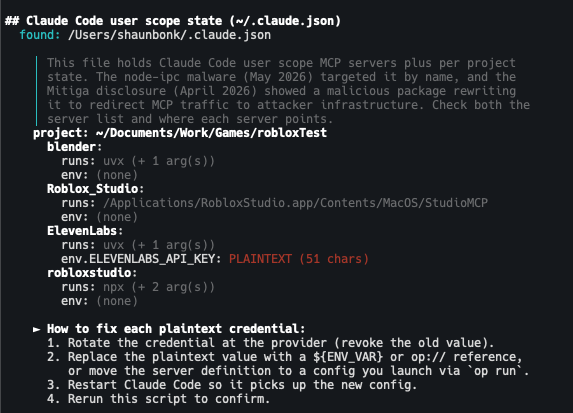
That finding is real, trimmed to one project for the screenshot. The flagged key is the ElevenLabs key from the Roblox project in the last article, the one my daughters use for sound effects. Here's the part worth sitting with: I rotated that key ages ago. The value in this file is dead. I even knew it was there and left it in deliberately so the tool would have something real to find. But a dead key in a config still tells anyone who sweeps the file which services you pay for, and the live replacement is one lazy paste away from joining it. Rotating a credential does not reach into every file you ever pasted it into. The file remembers. Clean it out.
Open a terminal. Run these:
# Look at every hook your Claude Code installation is going to run
cat ~/.claude/settings.json

# Same for any per project settings (run from each repo you've opened in Claude Code)
cat .claude/settings.json 2>/dev/null

# User scope MCP servers live in ~/.claude.json. The file is big; this pulls the server blocks.
grep -A 5 '"mcpServers"' ~/.claude.json 2>/dev/null

# Older Claude Code setups kept MCP servers here too. node-ipc targeted it by name.
cat ~/.claude/mcp.json 2>/dev/null

# Gemini CLI settings, another named target of the current wave
cat ~/.gemini/settings.json 2>/dev/null

# Project level rules files Cursor will run on every prompt
ls -la .cursor/rules/ 2>/dev/null

# Tasks that fire when you open a folder in VS Code or Cursor
cat .vscode/tasks.json 2>/dev/null

# Every credential currently in plaintext config
cat ~/.cursor/mcp.json 2>/dev/null
cat ~/Library/Application\ Support/Claude/claude_desktop_config.json 2>/dev/null
What you're looking for in settings.json is anything you don't remember writing under hooks. SessionStart, PreToolUse, PostToolUse. Any of them. Hooks aren't the only keys in that file that execute commands, either. apiKeyHelper, statusLine, awsAuthRefresh, and awsCredentialExport all run shell commands too, so check those while you're in there. In ~/.claude.json you're looking at each MCP server entry: is it one you installed, and does its command or URL point where you expect. In .cursor/rules/ you're looking for .mdc files you didn't create. Especially setup.mdc. Global Cursor rules live in the Settings UI, not on disk. Go check those there too. In tasks.json you're looking for tasks with "runOn": "folderOpen" that aren't yours. In the MCP configs you're looking at every value next to every API_KEY, every TOKEN, every SECRET. Anything that's a real value and not a reference is a credential currently sitting in plaintext on your disk.
Rotate every credential you find in plaintext config. Today. Not because the worm definitely got you. Because if you don't know what your settings.json contains right now, you don't know whether it did.
The honest section.
Go back to the TanStack attestations for a second. Provenance proves where and how a package was built. It does not prove what got built. npm's --provenance flag tops out at Build Level 2; the L3 isolation that would have blocked the cache poisoning is a different tier entirely. When the SLSA team published their own post mortem they were unusually direct about it. The badge passed. The package was malware. The SLSA team said so themselves.
The binding.gyp vector bypasses --ignore-scripts entirely. The current wave was specifically engineered to defeat the defense the previous wave taught us to deploy. The defenses are catching up. The attacks know that and are moving in the gaps.
DNS exfiltration through 1.1.1.1 and 8.8.8.8 bypasses most egress firewall and monitoring configurations because nobody is inspecting DNS at the query content level. Once malicious code is executing on your machine, the exfiltration channel is invisible to almost every defensive tool you have. And the TanStack payload never read its prize off disk at all. It pulled the OIDC token straight out of the runner process's memory through /proc. Once code runs where the credential lives, a token that never touches disk is still reachable. Even keychain storage is a partial defense.
There's one more thing worth knowing. Mitiga Labs disclosed a vulnerability to Anthropic on April 10 of this year. A malicious npm package's post install hook could rewrite ~/.claude.json to redirect MCP traffic to attacker controlled infrastructure. Anthropic responded April 12 that the issue was out of scope. Per Mitiga's writeup, the reasoning was that if you have code execution on the endpoint, many things are possible.
I would have written the same response in April. Read it now, with a worm in the wild doing the exact thing the response ruled outside scope, and the air goes out of the room. No CVE appears anywhere in the disclosure. None of this is anyone's fault and all of it is still happening.
Staged publishing is real and it works. So is the trusted publishing rebuild that npm has been quietly doing for the last nine months. Classic tokens were fully revoked November 19 of last year. Granular tokens with write access are capped at ninety day lifetimes. The authentication model under npm is mostly new. Most developers haven't noticed.
What these defenses cover:
- •The publisher side of an attack against the registry itself
- •Ephemeral OIDC credentials instead of long lived API tokens
- •A human in the loop on every publish for everyone who opts into staged publishing
- •An end to the "forgotten classic token bypassed the OIDC setup" failure mode that broke the axios attack
What they do not cover:
- •The first publish of a brand new package, which historically required a direct
npm publishwith a manual token. npm 11.10's newnpm trustcommand starts to close this gap. - •Self hosted runners (Jenkins, self hosted GitHub Actions runners). Trusted Publishing requires GitHub hosted runners, GitLab shared runners, or CircleCI cloud. Self hosted support is "planned."
- •The consumer side of the attack. None of this protects you from running
npm installon a malicious package. That's still on you and the defenses we walked through above. - •The TanStack class of attack, where the OIDC token gets stolen and used through the legitimate publisher identity with valid provenance. The defense and the attack are converging on the same primitive.
That last one is the uncomfortable part. The strongest defenses npm has shipped this year and the strongest attacks against npm this year are operating in the same infrastructure layer. The boundary between them is increasingly the question of who's holding the OIDC token at any given moment.
These defenses shrink the surface. They do not make you safe.
The .env file taught us not to commit secrets. The MCP config is teaching us not to install them. The hook your agent ran this morning was your hook. Tomorrow's might not be.

Run the audit when something hits the news cycle. Run it on a quiet day too. It takes longer to read this writeup than to check your own machine. Do both.
The puppy has the chair again. There's another worm out there somewhere. I'll have a hook ready when it surfaces.
